The JavaScript Basics -NodeJS.
Conditionals and Functions : Getting tasks done and gaining controls over your program.

The importance of taking a lesson in JavaScript in building different projects using NodeJs cannot be overemphasized.
In this articles, we will be talking about getting tasks done and gaining controls over your pieces of codes or program. This is going to be get done by the basics of the JavaScript language called conditionals –making use of loops like "do while", "for", "while" and also making the job easier through functions – emphasis will be placed on function declarations, function scope, nesting function , function hoisting and function calls.
The code below would have done more tasks if we introduce the use of function.
A function is a group of reusable code which can be called anywhere in your program. This eliminates the need of writing the same code again and again. It helps programmers in writing modular codes. Functions allow a programmer to divide a big program into a number of small and manageable function.
Function Definition
Before we can use a function, we need to define it. The most common way to define a function in JavaScript is by using the function keyword, followed by a unique function name, a list of parameters (that might be empty), and a statement block surrounded by curly braces.
function functionName(parameter-list) {
statements;
}
Calling a Function
To invoke a function, simply write the name of that function.
Function Scope
In JavaScript, function scope refers to the concept that variables declared within a function are only accessible within that function. They have local scope, meaning they are not visible or accessible outside of the function.
Nesting function
Function definitions can be nested within other functions as well.
Nesting functions involves defining one function inside another. This is a feature allowed in JavaScript and can be useful for encapsulating functionality or creating closures.
Function Hoisting
Function hoisting is a JavaScript behavior where function declarations are moved to the top of their containing scope during the compilation phase
Controls:LOOPS
While writing a program, you may encounter a situation where you need to perform an action over and over again.
JavaScript supports all the necessary loops to ease down the pressure of programming.
The while Loop
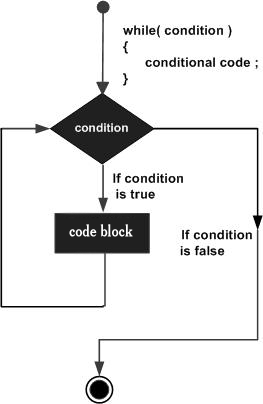
The most basic loop in JavaScript is the while loop which would be discussed in this chapter. The purpose of a while loop is to execute a statement or code block repeatedly as long as an expression is true. Once the expression becomes false, the loop terminates.
The do...while Loop
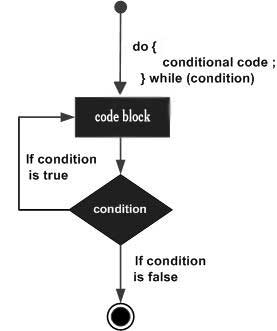
The do...while loop is similar to the while loop except that the condition check happens at the end of the loop. This means that the loop will always be executed at least once, even if the condition is false.
'for' loop is the most compact form
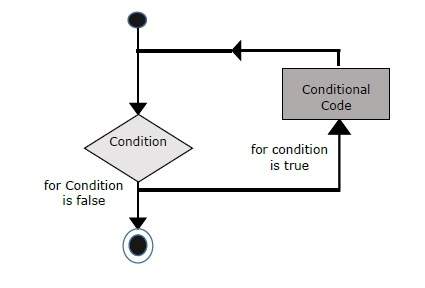
The loop initialization where we initialize our counter to a starting value. The initialization statement is executed before the loop begins.
The test statement which will test if a given condition is true or not. If the condition is true, then the code given inside the loop will be executed, otherwise the control will come out of the loop.
The iteration statement where you can increase or decrease your counter.
The for...in loop is used to loop through an object's properties.
Ref. https://www.tutorialspoint.com/index.htm
//Writing your first JavaScript program
//code to display welcome message to every user
let username = "Imoleayo Babatunde";
let country = "Nigeria";
let ageGroup = 20;
//this displays the user provide information inside the welcome message

console.log("Dear, "+username+" welcome to the MindHub. You will meet
others from your region, "+country+". You will be grouped accordingly to your
 age group, your group will be "+ageGroup+);